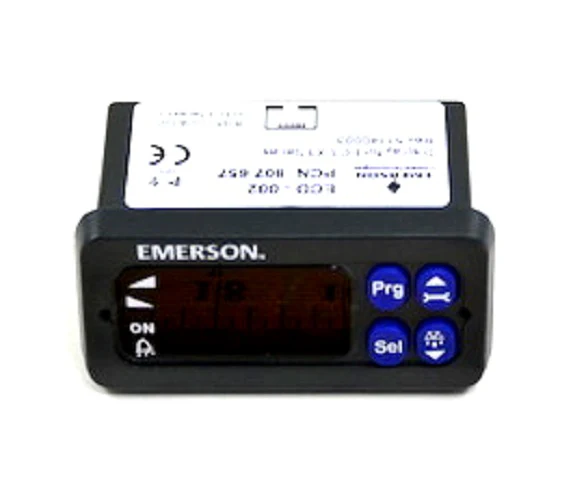
Emerson Alco 097712 Display/Keyboard
The Emerson Alco 097712 is a professional-grade ECD-002 Display and Keypad unit designed for seamless integration with the EC3 Superheat Controller series. This high-precision interface allows technicians to configure and monitor EX4 through EX8 electrical control valves directly at the system, ensuring optimal superheat regulation in refrigeration and HVAC applications. The ECD-002 keypad features a 4-button interface and a clear LED display to provide real-time status updates on valve opening percentages, alarm conditions, and system demand.
Engineered for field versatility, the unit supports quick parameter modification using the standard password protected configuration menu (default "12"). It connects via a standard ECC-Nxx or Cat5 cable with RJ45 connectors, allowing for flexible mounting in a 71x29 mm panel cutout. Because the EC3 controller is fully functional without the display after initial setup, this 097712 display module can be treated as a permanent fixture or a portable service tool for commissioning Alco Controls EXV systems. The rugged IP20 protection class and 24VAC power compatibility make it a reliable choice for commercial refrigeration superheat management.
Key Benefits- Universal Compatibility: Works with EC3-X33 and EC3-X32 series controllers managing EX4, EX5, EX6, EX7, and EX8 valves.
- Intuitive Diagnostics: Dedicated LED indicators provide instant feedback on valve status (opening/closing), system demand, and active alarms.
- Streamlined Commissioning: Essential for setting critical parameters including refrigerant type, pressure sensor scaling, and valve selection during start-up.
- Flexible Mounting: Can be installed or removed at any time during operation without interrupting controller functionality.
- Unit Customization: Supports toggling between K/bar/°C and R/psig/°F to match site requirements.
Is the ECD-002 required for the EC3 controller to function?
No, the EC3 controller is stand-alone. The ECD-002 display/keyboard is required for initial setup and parameter modification, but the controller will maintain operations even if the display is disconnected.
What type of cable is required for connection?
The unit connects to the EC3 using a standard Cat5 cable with RJ45 plugs or a dedicated Emerson ECC-Nxx cable. Ensure the cable is a straight-through patch cord.
How do I access the configuration menu?
Press and hold the PRG button for 5 seconds until a "0" flashes. Use the arrow keys to enter the factory password "12" and confirm with the SEL button to modify superheat setpoints and system parameters.
This item is not eligible for free shipping.
Disclaimer: While we strive for 100% accuracy, product data and specifications are subject to change. Please contact our team to confirm compatibility or technical details before purchasing.
Original: $146.19
-65%$146.19
$51.17Emerson Alco 097712 Display/Keyboard
The Emerson Alco 097712 is a professional-grade ECD-002 Display and Keypad unit designed for seamless integration with the EC3 Superheat Controller series. This high-precision interface allows technicians to configure and monitor EX4 through EX8 electrical control valves directly at the system, ensuring optimal superheat regulation in refrigeration and HVAC applications. The ECD-002 keypad features a 4-button interface and a clear LED display to provide real-time status updates on valve opening percentages, alarm conditions, and system demand.
Engineered for field versatility, the unit supports quick parameter modification using the standard password protected configuration menu (default "12"). It connects via a standard ECC-Nxx or Cat5 cable with RJ45 connectors, allowing for flexible mounting in a 71x29 mm panel cutout. Because the EC3 controller is fully functional without the display after initial setup, this 097712 display module can be treated as a permanent fixture or a portable service tool for commissioning Alco Controls EXV systems. The rugged IP20 protection class and 24VAC power compatibility make it a reliable choice for commercial refrigeration superheat management.
Key Benefits- Universal Compatibility: Works with EC3-X33 and EC3-X32 series controllers managing EX4, EX5, EX6, EX7, and EX8 valves.
- Intuitive Diagnostics: Dedicated LED indicators provide instant feedback on valve status (opening/closing), system demand, and active alarms.
- Streamlined Commissioning: Essential for setting critical parameters including refrigerant type, pressure sensor scaling, and valve selection during start-up.
- Flexible Mounting: Can be installed or removed at any time during operation without interrupting controller functionality.
- Unit Customization: Supports toggling between K/bar/°C and R/psig/°F to match site requirements.
Is the ECD-002 required for the EC3 controller to function?
No, the EC3 controller is stand-alone. The ECD-002 display/keyboard is required for initial setup and parameter modification, but the controller will maintain operations even if the display is disconnected.
What type of cable is required for connection?
The unit connects to the EC3 using a standard Cat5 cable with RJ45 plugs or a dedicated Emerson ECC-Nxx cable. Ensure the cable is a straight-through patch cord.
How do I access the configuration menu?
Press and hold the PRG button for 5 seconds until a "0" flashes. Use the arrow keys to enter the factory password "12" and confirm with the SEL button to modify superheat setpoints and system parameters.
This item is not eligible for free shipping.
Disclaimer: While we strive for 100% accuracy, product data and specifications are subject to change. Please contact our team to confirm compatibility or technical details before purchasing.
Product Information
Product Information
Shipping & Returns
Shipping & Returns
Description
The Emerson Alco 097712 is a professional-grade ECD-002 Display and Keypad unit designed for seamless integration with the EC3 Superheat Controller series. This high-precision interface allows technicians to configure and monitor EX4 through EX8 electrical control valves directly at the system, ensuring optimal superheat regulation in refrigeration and HVAC applications. The ECD-002 keypad features a 4-button interface and a clear LED display to provide real-time status updates on valve opening percentages, alarm conditions, and system demand.
Engineered for field versatility, the unit supports quick parameter modification using the standard password protected configuration menu (default "12"). It connects via a standard ECC-Nxx or Cat5 cable with RJ45 connectors, allowing for flexible mounting in a 71x29 mm panel cutout. Because the EC3 controller is fully functional without the display after initial setup, this 097712 display module can be treated as a permanent fixture or a portable service tool for commissioning Alco Controls EXV systems. The rugged IP20 protection class and 24VAC power compatibility make it a reliable choice for commercial refrigeration superheat management.
Key Benefits- Universal Compatibility: Works with EC3-X33 and EC3-X32 series controllers managing EX4, EX5, EX6, EX7, and EX8 valves.
- Intuitive Diagnostics: Dedicated LED indicators provide instant feedback on valve status (opening/closing), system demand, and active alarms.
- Streamlined Commissioning: Essential for setting critical parameters including refrigerant type, pressure sensor scaling, and valve selection during start-up.
- Flexible Mounting: Can be installed or removed at any time during operation without interrupting controller functionality.
- Unit Customization: Supports toggling between K/bar/°C and R/psig/°F to match site requirements.
Is the ECD-002 required for the EC3 controller to function?
No, the EC3 controller is stand-alone. The ECD-002 display/keyboard is required for initial setup and parameter modification, but the controller will maintain operations even if the display is disconnected.
What type of cable is required for connection?
The unit connects to the EC3 using a standard Cat5 cable with RJ45 plugs or a dedicated Emerson ECC-Nxx cable. Ensure the cable is a straight-through patch cord.
How do I access the configuration menu?
Press and hold the PRG button for 5 seconds until a "0" flashes. Use the arrow keys to enter the factory password "12" and confirm with the SEL button to modify superheat setpoints and system parameters.
This item is not eligible for free shipping.
Disclaimer: While we strive for 100% accuracy, product data and specifications are subject to change. Please contact our team to confirm compatibility or technical details before purchasing.