Mitsubishi Electric MRCH2 Control
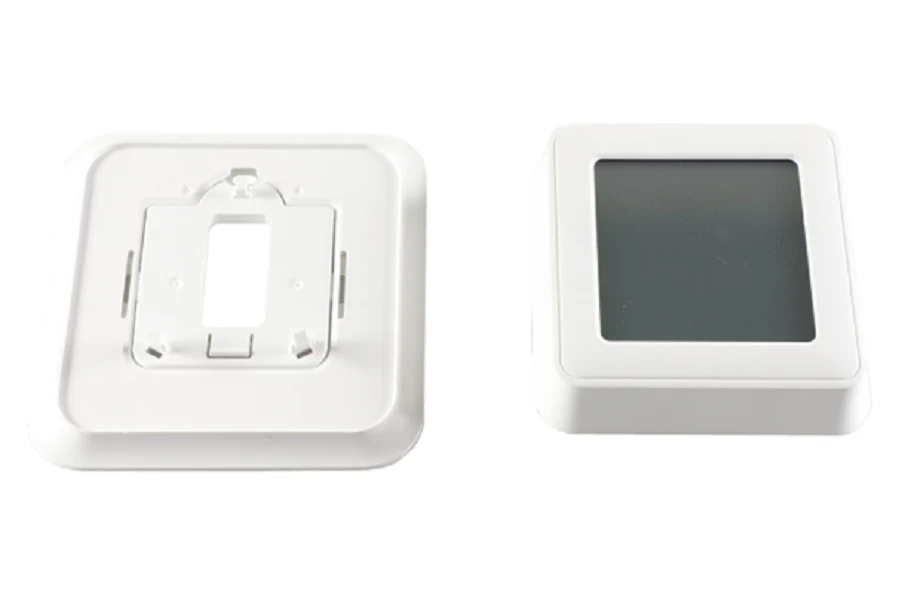
The Mitsubishi Electric MRCH2 Control is a professional-grade RedLINK 3.0 wireless remote controller designed for seamless integration with M-Series, P-Series, and City Multi indoor units. Operating on the latest RedLINK 3.0 protocol, this controller provides enhanced signal reliability and avoids interference with common household frequencies. Unlike its predecessors, the MRCH2 offers dual set point control for automatic changeover between heating and cooling modes, ensuring precise ambient management in residential and light commercial applications. It features a high-contrast, backlit touchscreen interface and supports advanced HVAC diagnostics, displaying error codes directly on the screen for rapid troubleshooting. For contractors managing multi-zone systems, the MRCH2 supports flexible scheduling (5-2, 5-1-1, or individual daily programming) and can be combined with the PAC-USWHS002-WF-2 Wireless Interface 2 for kumo cloud app integration. The kit requires an MIFH2 receiver and MRC2 cable for full functionality, connecting directly to the CN105 internal port on the indoor unit control board. Performance is optimized for systems requiring discrete temperature and humidity offset adjustments at the localized sensing point.
Key Benefits
- RedLINK 3.0 Technology: Provides a robust, interference-free wireless connection with an expanded range compared to 2.0 legacy gear.
- Dual Set Point Functionality: Automates climate control by maintaining separate heating and cooling thresholds without manual mode switching.
- Technical Diagnostics: Integrated error code reporting simplifies maintenance and reduces time-on-site for service technicians.
- Universal Compatibility: Works across 28 different Mitsubishi Electric indoor models, including floor-mounted and ceiling cassette configurations.
- kumo cloud Ready: Easily pairs with Wi-Fi interfaces to allow both local wireless control and remote cloud-based management.
Common Questions
Is the MRCH2 compatible with older MHK1 RedLINK 2.0 receivers?
No, the MRCH2 utilizes RedLINK 3.0 and is not backward compatible with MHK1, MOS1, or MCCH1 accessories. You must replace the entire kit, including the receiver, when upgrading from 2.0 to 3.0.
How do I find the PIN code for initial configuration?
The installer PIN code is generated by taking the four-digit date code located on the back of the MRCH2 controller and adding 1234 to that number.
Can I use this with kumo cloud and a wireless remote simultaneously?
Yes, but they must be connected via the Wireless Interface 2 (PAC-USWHS002-WF-2). The MIFH2 receiver should be plugged into the additional CN105 port on the wireless interface specifically.
This item is not eligible for free shipping.
Disclaimer: While we strive for 100% accuracy, product data and specifications are subject to change. Please contact our team to confirm compatibility or technical details before purchasing.
Original: $499.74
-65%$499.74
$174.91Mitsubishi Electric MRCH2 Control
The Mitsubishi Electric MRCH2 Control is a professional-grade RedLINK 3.0 wireless remote controller designed for seamless integration with M-Series, P-Series, and City Multi indoor units. Operating on the latest RedLINK 3.0 protocol, this controller provides enhanced signal reliability and avoids interference with common household frequencies. Unlike its predecessors, the MRCH2 offers dual set point control for automatic changeover between heating and cooling modes, ensuring precise ambient management in residential and light commercial applications. It features a high-contrast, backlit touchscreen interface and supports advanced HVAC diagnostics, displaying error codes directly on the screen for rapid troubleshooting. For contractors managing multi-zone systems, the MRCH2 supports flexible scheduling (5-2, 5-1-1, or individual daily programming) and can be combined with the PAC-USWHS002-WF-2 Wireless Interface 2 for kumo cloud app integration. The kit requires an MIFH2 receiver and MRC2 cable for full functionality, connecting directly to the CN105 internal port on the indoor unit control board. Performance is optimized for systems requiring discrete temperature and humidity offset adjustments at the localized sensing point.
Key Benefits
- RedLINK 3.0 Technology: Provides a robust, interference-free wireless connection with an expanded range compared to 2.0 legacy gear.
- Dual Set Point Functionality: Automates climate control by maintaining separate heating and cooling thresholds without manual mode switching.
- Technical Diagnostics: Integrated error code reporting simplifies maintenance and reduces time-on-site for service technicians.
- Universal Compatibility: Works across 28 different Mitsubishi Electric indoor models, including floor-mounted and ceiling cassette configurations.
- kumo cloud Ready: Easily pairs with Wi-Fi interfaces to allow both local wireless control and remote cloud-based management.
Common Questions
Is the MRCH2 compatible with older MHK1 RedLINK 2.0 receivers?
No, the MRCH2 utilizes RedLINK 3.0 and is not backward compatible with MHK1, MOS1, or MCCH1 accessories. You must replace the entire kit, including the receiver, when upgrading from 2.0 to 3.0.
How do I find the PIN code for initial configuration?
The installer PIN code is generated by taking the four-digit date code located on the back of the MRCH2 controller and adding 1234 to that number.
Can I use this with kumo cloud and a wireless remote simultaneously?
Yes, but they must be connected via the Wireless Interface 2 (PAC-USWHS002-WF-2). The MIFH2 receiver should be plugged into the additional CN105 port on the wireless interface specifically.
This item is not eligible for free shipping.
Disclaimer: While we strive for 100% accuracy, product data and specifications are subject to change. Please contact our team to confirm compatibility or technical details before purchasing.
Product Information
Product Information
Shipping & Returns
Shipping & Returns
Description
The Mitsubishi Electric MRCH2 Control is a professional-grade RedLINK 3.0 wireless remote controller designed for seamless integration with M-Series, P-Series, and City Multi indoor units. Operating on the latest RedLINK 3.0 protocol, this controller provides enhanced signal reliability and avoids interference with common household frequencies. Unlike its predecessors, the MRCH2 offers dual set point control for automatic changeover between heating and cooling modes, ensuring precise ambient management in residential and light commercial applications. It features a high-contrast, backlit touchscreen interface and supports advanced HVAC diagnostics, displaying error codes directly on the screen for rapid troubleshooting. For contractors managing multi-zone systems, the MRCH2 supports flexible scheduling (5-2, 5-1-1, or individual daily programming) and can be combined with the PAC-USWHS002-WF-2 Wireless Interface 2 for kumo cloud app integration. The kit requires an MIFH2 receiver and MRC2 cable for full functionality, connecting directly to the CN105 internal port on the indoor unit control board. Performance is optimized for systems requiring discrete temperature and humidity offset adjustments at the localized sensing point.
Key Benefits
- RedLINK 3.0 Technology: Provides a robust, interference-free wireless connection with an expanded range compared to 2.0 legacy gear.
- Dual Set Point Functionality: Automates climate control by maintaining separate heating and cooling thresholds without manual mode switching.
- Technical Diagnostics: Integrated error code reporting simplifies maintenance and reduces time-on-site for service technicians.
- Universal Compatibility: Works across 28 different Mitsubishi Electric indoor models, including floor-mounted and ceiling cassette configurations.
- kumo cloud Ready: Easily pairs with Wi-Fi interfaces to allow both local wireless control and remote cloud-based management.
Common Questions
Is the MRCH2 compatible with older MHK1 RedLINK 2.0 receivers?
No, the MRCH2 utilizes RedLINK 3.0 and is not backward compatible with MHK1, MOS1, or MCCH1 accessories. You must replace the entire kit, including the receiver, when upgrading from 2.0 to 3.0.
How do I find the PIN code for initial configuration?
The installer PIN code is generated by taking the four-digit date code located on the back of the MRCH2 controller and adding 1234 to that number.
Can I use this with kumo cloud and a wireless remote simultaneously?
Yes, but they must be connected via the Wireless Interface 2 (PAC-USWHS002-WF-2). The MIFH2 receiver should be plugged into the additional CN105 port on the wireless interface specifically.
This item is not eligible for free shipping.
Disclaimer: While we strive for 100% accuracy, product data and specifications are subject to change. Please contact our team to confirm compatibility or technical details before purchasing.